
5


How To Increase and Boost Internet Speed
Many people search how to increase Internet speed, I’ll share few PC Tips and tricks which will boost internet speed. Learn how to increase download speed.
There are many ways to improve internet speed but I’ll focus on important one’s which have most effect on increasing internet speed.
Ways To Boost Internet Speed
Method 1: Use Full Internet Bandwidth
In Windows 20% of Internet bandwidth is reserved which is used for windows updates and internal system. This is reserved for windows’s own use. You should disable this and get full internet bandwidth. Cut the windows part of bandwidth and you can boost net speed. There is no need to install any extra software to do this.
Step 1
Follow the screenshot and Click on Start button and type gpedit.msc and press enter.

Step 2
Now double click the Computer Configuration as per screenshot.

Step 3
Now double click Administrative Templates.
Step 4
Now Double Click Network.
Step 5
Now Double Click QoS Packet Scheduler.
Step 6
Now double click Limit reservable bandwidth.

Step 7
First Click on Enabled.
Then change Bandwidth Limit(%) to 0 (zero). As per screenshot.
Then Click OK.
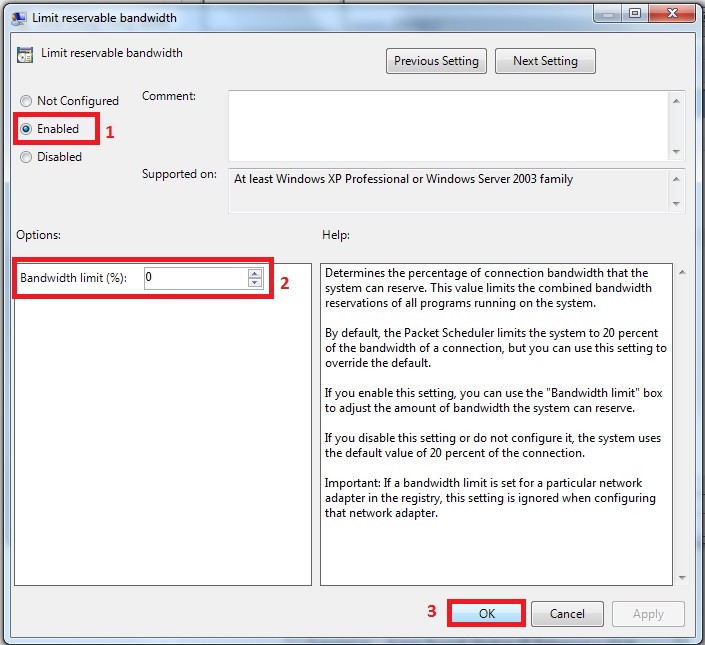
After click OK button you have now cut the part of windows bandwidth. There is no reserved bandwidth now. You will feel a difference thatInternet speed is optimized now.
Method 2: Use Internet Download Manager To Increase download Speed
There are third party softwares also which increase download speed significantly. You can download IDM 6.15 Free to optimize download speed. 6.15 is Latest version version of Internet download manager.
Features of IDM
Pause and Resume Downloads
Boost Download Speed
If Youtube is blocked then you can still download download youtube videos using proxy.
Method 3: Use CCleaner
Sometimes your PC is full of browsing history, cache and cookies. You can download CCleaner free which is best software to remove the garbage from C Drive. CCleaner will ultimately have an effect on Internet speed.
Important Note
Using the above methods will increase internet speed but still the final dependency is on your Internet connection bandwidth. So you should upgrade to a good connection bandwidth plan if you face huge issues even after trying above method.
If you hit any issues while trying above methods to increase internet speed then please feel free to comment here. I’ll be more than happy to assist you.
Subscribe to:
Post Comments (Atom)
5 Responses to “How To Increase and Boost Internet Speed”
June 13, 2013 at 11:53 PM
Thanks for sharing this post. Just Watch this video tutorial and Learn how to Increase your Internet Speed Easily
http://www.youtube.com/watch?v=o8Po3P8xnbU
September 18, 2013 at 12:09 AM
Thanks for your information. You can also try another method to increase your internet speed.
1)If your system internet speed is very slow. First reset your modem
2)Delete all cookies and temporary files.
3)Use different browser. Because normally some browser enabled javascript
and flash video ,so the webpages is loaded very slow.So you can try it
different browser.
4)Virus,malwares is also another important thing it will make a slow connection.
So use a good antivirus software to remove all virus and malwares .
Finally go to this site Scanmyspeed.com then check your internet speed
it will definitely works very fast
January 25, 2014 at 4:14 AM
Thanks
February 16, 2014 at 7:59 PM
new news
February 17, 2014 at 7:38 PM
new news
Post a Comment